Carga de red jerárquica bajo demanda
The Ignite UI for Web Components IgcHierarchicalGridComponent allows fast rendering by requesting the minimum amount of data to be retrieved from the server so that the user can see the result in view and interact with the visible data as quickly as possible. Initially only the root grid’s data is retrieved and rendered, only after the user expands a row containing a child grid, he will receive the data for that particular child grid. This mechanism, also known as Load on Demand, can be easily configured to work with any remote data.
En este tema se muestra cómo configurar la carga a petición mediante la creación de un proveedor de servicios remotos que se comunica con un servicio remoto ya disponible. Aquí está la demostración de trabajo y luego la revisaremos paso a paso y describiremos el proceso de creación.
Web Components Hierarchical Grid Load On Demand Example
Remote Service Provider
Primero, prepararemos a nuestro proveedor de servicios para que estemos listos para obtener los datos que necesitaríamos para la cuadrícula jerárquica.
Getting basic data
We will be communicating with our backend service over HTTP protocol using the fetch() global function the browsers provide. That way in order to get our data we will need this simple method in our service:
export async function getData(dataState: any): Promise<any> {
    const response = await fetch(buildUrl(dataState));
    const data = await response.json();
    return data;
}
As you can see buildUrl() will be the method that will generate our url based on the data that we have received. We return a Promise, since this is executed asynchronously. That way we can later subscribe to it, process it further in our application and pass it to our grid.
Building our request url
Next we will define how we should build our URL for the GET request. This is where we will be able to get the data for our main grid but also for any child grid inside it. We will use the Customers data from this topic for our root level and use Orders and Details for the lower levels. The model will differ per application but we will use the following one:
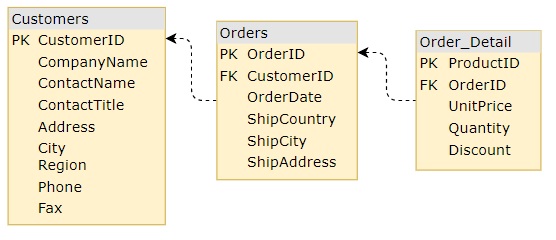
What we first need is the key of our table to determine from where to get the data for the desired grid, the primary key of the parent row and its unique ID.
We will define all this in the dataState object. An example:
const dataState: {
    key: string;
    parentID: any;
    parentKey: string;
    rootLevel: boolean;
} = {
    //...
};

function buildUrl(dataState: any) {
    let qS = "";
    if (dataState) {
        if (dataState.rootLevel) {
            qS += `${dataState.key}`;
        } else {
            qS += `${dataState.parentKey}/${dataState.parentID}/${dataState.key}`;
        }
    }
    return `${URL}${qS}`;
}
Result
Finalmente, así es como se vería nuestro servicio remoto:
const URL = `https://data-northwind.indigo.design/`;

export async function getData(dataState: any): Promise<any> {
    const response = await fetch(buildUrl(dataState));
    const data = await response.json();
    return data;
}

function buildUrl(dataState: any) {
    let qS = "";
    if (dataState) {
        if (dataState.rootLevel) {
            qS += `${dataState.key}`;
        } else {
            qS += `${dataState.parentKey}/${dataState.parentID}/${dataState.key}`;
        }
    }
    return `${URL}${qS}`;
}
Hierarchical Grid Setup
A continuación configuraremos nuestra red jerárquica y la conectaremos a nuestro proveedor de servicios remoto.
Template defining
First we will define our hierarchical grid template with the levels of hierarchy that we expect to have. We know that our root grid primaryKey for the customers is their customerId, for their orders on the first level - orderId and respectively for order details - productId. Knowing each database table and their keys allows us to define our initial template:
<igc-hierarchical-grid id="hGrid" primary-key="customerId" height="600px">
    <igc-column field="customerId" hidden="true"></igc-column>
    <igc-column field="companyName" header="Company Name"></igc-column>
    <igc-column field="contactName" header="Contact Name"></igc-column>
    <igc-column field="contactTitle" header="Contact Title"></igc-column>
    <igc-column field="address.country" header="Country"></igc-column>
    <igc-column field="address.phone" header="Phone"></igc-column>
    <igc-row-island child-data-key="Orders" primary-key="orderId">
        <igc-column field="orderId" hidden="true"></igc-column>
        <igc-column field="shipAddress.country" header="Ship Country"></igc-column>
        <igc-column field="shipAddress.city" header="Ship City"></igc-column>
        <igc-column field="shipAddress.street" header="Ship Address"></igc-column>
        <igc-column field="orderDate" header="Order Date" data-type="date"></igc-column>
        <igc-row-island child-data-key="Details" primary-key="productId">
            <igc-column field="productId" hidden="true"></igc-column>
            <igc-column field="quantity" header="Quantity"></igc-column>
            <igc-column field="unitPrice" header="Unit Price"></igc-column>
            <igc-column field="discount" header="Discount"></igc-column>
        </igc-row-island>
    </igc-row-island>
</igc-hierarchical-grid>
Sin embargo, hay una cosa que falta en nuestra plantilla, y son los datos de nuestra cuadrícula jerárquica de nivel raíz y, finalmente, sus hijos.
We will easily set the data of the root grid after getting its data from the service in our code later, since we can use the id="hGrid" reference.
Setting the data for any child that has been expanded is a bit different. When a row is expanded for the first time, a new child IgcHierarchicalGridComponent is rendered for it and we need to get the reference for the newly created grid to set its data. That is why each IgcRowIslandComponent component provides the GridCreated event that is fired when a new child grid is created for that specific row island. We can use that to get the reference we need for the new grid, request its data from the service, and apply it.
Podemos usar un método para todas las islas de filas, ya que creamos nuestro servicio de modo que solo necesite información si es el nivel raíz, la clave de la isla de filas, la clave principal de la fila principal y su identificador único. Se puede acceder a toda esta información directamente desde los argumentos del evento o desde la isla de fila responsable de desencadenar el evento.
Let's name the method that we will use gridCreated.
Since the GridCreated event provides the parentID property, a reference to the row island as owner and the new child grid property, it will be passed as the first argument. We are only missing information about the parent row's primaryKey, but we can easily pass that as a second argument, depending on which row island we bind.
El archivo de plantilla, con estos cambios agregados, se vería así:
<igc-hierarchical-grid id="hGrid" primary-key="customerId" height="600px">
    <igc-column field="customerId" hidden="true"></igc-column>
    <igc-column field="companyName" header="Company Name"></igc-column>
    <igc-column field="contactName" header="Contact Name"></igc-column>
    <igc-column field="contactTitle" header="Contact Title"></igc-column>
    <igc-column field="address.country" header="Country"></igc-column>
    <igc-column field="address.phone" header="Phone"></igc-column>
    <igc-row-island id="ordersRowIsland" child-data-key="Orders" primary-key="orderId">
        <igc-column field="orderId" hidden="true"></igc-column>
        <igc-column field="shipAddress.country" header="Ship Country"></igc-column>
        <igc-column field="shipAddress.city" header="Ship City"></igc-column>
        <igc-column field="shipAddress.street" header="Ship Address"></igc-column>
        <igc-column field="orderDate" header="Order Date" data-type="date"></igc-column>
        <igc-row-island id="orderDetailsRowIsland" child-data-key="Details" primary-key="productId">
            <igc-column field="productId" hidden="true"></igc-column>
            <igc-column field="quantity" header="Quantity"></igc-column>
            <igc-column field="unitPrice" header="Unit Price"></igc-column>
            <igc-column field="discount" header="Discount"></igc-column>
        </igc-row-island>
    </igc-row-island>
</igc-hierarchical-grid>
constructor() {
    const ordersRowIsland = document.getElementById("ordersRowIsland");
    const orderDetailsRowIsland = document.getElementById("orderDetailsRowIsland");

    ordersRowIsland.addEventListener("gridCreated", (event: any) => {
        this.gridCreated(event, "Customers");
    });

    orderDetailsRowIsland.addEventListener("gridCreated", (event: any) => {
        this.gridCreated(event, "Orders");
    });
}
Connecting our service
Uno de nuestros últimos pasos ahora será conectar nuestro servicio creado previamente a nuestra cuadrícula jerárquica.
We will get a reference to our root grid to set its data. As it doesn't have any parents we can only pass that rootLevel is true, and the key for it, to the getData of our service. Since it returns a Promise we will need to subscribe to it:
constructor() {
    const hierarchicalGrid = document.getElementById("hGrid") as IgcHierarchicalGridComponent;

    getData({ parentID: null, rootLevel: true, key: "Customers" }).then((data: any) => {
        hierarchicalGrid.data = data;
        hierarchicalGrid.markForCheck();
    });
}
Next, we only need to create our gridCreated method that will request data for any new child grid created.
It will be similar to getting the root level grid data, just this time we will need to pass more information, like parentID and parentKey. rootLevel will be false for any child:
public gridCreated(event: CustomEvent<IgcGridCreatedEventArgs>, _parentKey: string) {
    const context = event.detail;
    const dataState = {
        key: context.owner.childDataKey,
        parentID: context.parentID,
        parentKey: _parentKey,
        rootLevel: false
    };

    getData(dataState).then((data: any[]) => {
        context.grid.data = data;
        context.grid.markForCheck();
    });
}
With this, the setup of our application is almost done. This last step aims to improve the user experience by informing the user that the data is still loading so he doesn't have to look at an empty grid in the meantime. That's why the IgcHierarchicalGridComponent supports a loading indicator that can be displayed while the grid is empty. If new data is received, the loading indicator will hide and the data will be rendered.
Setup of loading indication
The IgcHierarchicalGridComponent can display a loading indicator by setting the isLoading property to true while there is no data. We need to set it initially for the root grid and also when creating new child grids, until their data is loaded. We could always set it to true in our template, but we want to hide it and display that the grid has no data if the service returns an empty array by setting it to false.
En este caso, la versión final de nuestra configuración se vería así:
constructor() {
    const hierarchicalGrid = document.getElementById("hGrid") as IgcHierarchicalGridComponent;
    const ordersRowIsland = document.getElementById("ordersRowIsland");
    const orderDetailsRowIsland = document.getElementById("orderDetailsRowIsland");

    ordersRowIsland.addEventListener("gridCreated", (event: any) => {
        this.gridCreated(event, "Customers");
    });

    orderDetailsRowIsland.addEventListener("gridCreated", (event: any) => {
        this.gridCreated(event, "Orders");
    });

    hierarchicalGrid.isLoading = true;

    getData({ parentID: null, rootLevel: true, key: "Customers" }).then((data: any) => {
        hierarchicalGrid.isLoading = false;
        hierarchicalGrid.data = data;
        hierarchicalGrid.markForCheck();
    });
}

public gridCreated(event: CustomEvent<IgcGridCreatedEventArgs>, _parentKey: string) {
    const context = event.detail;
    const dataState = {
        key: context.owner.childDataKey,
        parentID: context.parentID,
        parentKey: _parentKey,
        rootLevel: false
    };

    context.grid.isLoading = true;

    getData(dataState).then((data: any[]) => {
        context.grid.isLoading = false;
        context.grid.data = data;
        context.grid.markForCheck();
    });
}
API References
Additional Resources
Nuestra comunidad es activa y siempre da la bienvenida a nuevas ideas.