Skip to content
Andrew Wigglesworth
Andrew Wigglesworth asked on Dec 31, 2025 12:49 PM

Hi There,

I’m looking for some cell templating examples for asp.net core mvc helper. I’ve been through the documentation, blogs etc but cannot find details on this. Specifically what i’m trying to do is that when i hover over a particular column i would like it to display the full contents of a different column in the grid. Right now i’m using an unbound column to render a hyperlink that will show it, but it’s not ideal.

Are there any sample projects that have this functionality that i can look at?

Thanks

Sign In to post a reply

Replies

  • 0
    Georgi Anastasov
    Georgi Anastasov answered on Jan 15, 2024 11:00 AM

    Hello,

    I have been looking into your question and in order to ensure that the described scenario is addressed correctly, I will need some additional information regarding your scenario. Could you please answer the following questions:

    • What template do you need exactly cell template or column header template?
    • Where exactly do you want to hover on the column header or column cells?
    • What do you want displayed on hover, the content of the cell itself if you hover over a cell, the content of the header if you hover over a column header, or something else?
    • What is the purpose of using this hyperlink in an unbound column?
    • Could you provide more detailed information, screenshots, videos or code snippets?

    This information is going to be highly appreciated and will help me in my further investigation.

    Looking forward to hearing from you.

    Thank you for your cooperation.

    Regards,

    Georgi Anastasov

    Entry Level Software Developer

    Infragistics

    • 0
      Andrew Wigglesworth
      Andrew Wigglesworth answered on Jan 15, 2024 5:21 PM

      Hi Georgi,

      Really what i'm looking for is some examples on how to use the cell Template feature using the asp.net mvc helper in .net core. What i'm trying to do, is that when i hover over a specific cell, it will show a popup of a different cell value. For display purposes we're truncating the value of the initial cell to 50 characters,, but when we hover over the cell we want to show the full contents of the data field. I've accomplished it temporatily by adding a hyper link and modal window, which works. But if we could do an on-hover event it would be even better.

      Here's the code that renders the grid:

      @(
      Html.Infragistics().Grid(Model.ReportData).ID("grid1")
      .PrimaryKey("NotificationId")
      .AutoGenerateColumns(false)
      .Columns(column =>
      {
      column.For(x => x.NotificationId).Hidden(true);
      column.For(x => x.NotificationDate).HeaderText("Notification Date");
      column.For(x => x.NotificationType).HeaderText("Notification Type").DataType("string");
      column.For(x => x.MessageType).HeaderText("Message Type");
      column.For(x => x.Subject).HeaderText("Subject Line");
      column.For(x => x.Customer).HeaderText("Customer Number");
      column.For(x => x.Email).HeaderText("Email Address");
      column.For(x => x.Phone).HeaderText("Mobile");
      column.For(x => x.Status).HeaderText("Phone Number");
      column.For(x => x.ErrorMessage).HeaderText("Error Message");
      column.For(x => x.MessageText).HeaderText("Message Text");
      column.Unbound("ViewMessage").Template("<a href='javascript:ShowMessageText(${NotificationId});' title='View'><i class='fa-solid fa-magnifying-glass' style='color:#154c79'></a>").HeaderText("View Message");
      }).Features(features =>
      {
      features.Sorting().Type(OpType.Local);
      features.Paging().Type(OpType.Local).PageSize(100);
      features.Filtering().Type(OpType.Local);
      })
      .Height("800").Width("100%").DataBind().Render()
      )

      and the javascript call that populates the modal window:

      function ShowMessageText(notificationId) {
      $.ajax({
      type: "POST",
      url: "/Reports/MessageTextPopup",
      data: { "notificationId": notificationId },
      success: function (response) {
      $("#partialModal").find(".modal-body").html(response);
      $("#partialModal").modal('show');
      },
      failure: function (response) {
      alert(response.responseText);
      },
      error: function (response) {
      alert(response.responseText);
      }
      });
      }

      • 0
        Georgi Anastasov
        Georgi Anastasov answered on Jan 16, 2024 10:00 AM

        Hello,

        Thank you for the provided information.

        I have been looking into your question and in order to achieve your requirements and have a tooltip of cells from a specific column or several columns, what I can suggest as an approach is to handle the Tooltip igGrid feature.

        First, you’ll handle the Template property of the column or columns you want to have a tooltip for their cells. In the template, you will insert a paragraph element with a set class that will contain additional styles about the tooltip and display the information for each cell.

        column.For(x => x.Description).HeaderText("Description").DataType("string").Width("400px").Template("

        ${ Description}

        “);

        The paragraph element class for the template column will contain additional white-space, text-overflow, and overflow styles to display the tooltip properly.

        .tooltip-grid-notes {
             white-space: nowrap;
             text-overflow: ellipsis;
             overflow: hidden;
        }

        Then, in the igGrid control’s feature definition, you’ll add the Tooltip feature.

        Features(features =>
                 {
                     features.Tooltips();
                  }
        );

        In addition, you will handle the Visibility property of the tooltip feature and enable the tooltips to always be displayed by passing TooltipsVisibility.Always.

        Features(features =>
                 {
                     features.Tooltips().Visibility(TooltipsVisibility.Always);
                  }
        );


        You can then handle the ColumnSettings of the tooltip feature and handle the settings for each individual column whether to display a tooltip for it or not according to your requirements. This will be done by handling the AllowTooltips property and passing true or false to display or not display the tooltip.

        Features(features =>
                 {
                     features.Tooltips().Visibility(TooltipsVisibility.Always).ColumnSettings(settings =>
                     {
                         settings.ColumnSetting().ColumnKey("CustomerID").AllowTooltips(false);
                         settings.ColumnSetting().ColumnKey("CompanyName").AllowTooltips(false);
                         settings.ColumnSetting().ColumnKey("ContactName").AllowTooltips(false);
                         settings.ColumnSetting().ColumnKey("Address").AllowTooltips(true);
                         settings.ColumnSetting().ColumnKey("City").AllowTooltips(false);
                         settings.ColumnSetting().ColumnKey("Salary").AllowTooltips(false);
                         settings.ColumnSetting().ColumnKey("Description").AllowTooltips(true);
                     });
                 })

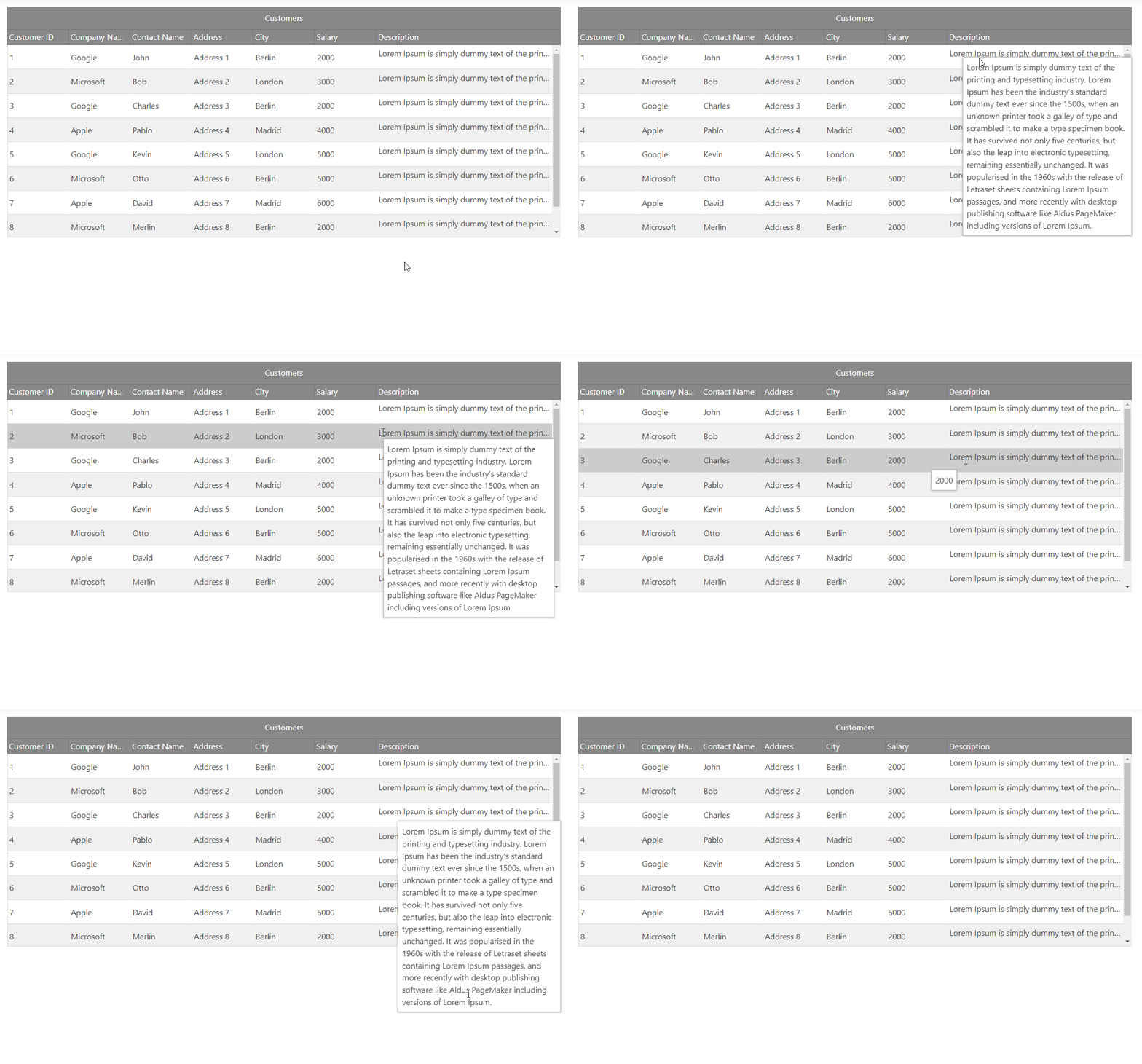
        The described scenario could be observed here:

        In addition, I have prepared a small sample illustrating this behavior which could be found attached here. Please test it on your side and let me know how it behaves.

        More information can be found in the Tooltips Feature topic from our Ignite UI jQuery documentation.

        If you require any further assistance on the matter, please let me know.

        igGridCellTemplateTooltip

        Regards,

        Georgi Anastasov

        Entry Level Software Developer

        Infragistics

  • You must be logged in to reply to this topic.
Discussion created by
Favorites
Replies
Created On
Last Post
Discussion created by
Andrew Wigglesworth
Favorites
0
Replies
3
Created On
Dec 31, 2025
Last Post
2 years, 1 month ago

Suggested Discussions

Created by

Created on

Dec 31, 2025 12:49 PM

Last activity on

Feb 23, 2026 1:59 PM