Skip to content

Infragistics Community Forum / Web / Ignite UI for Angular / Having issues with Text being cut of in drop down box

Having issues with Text being cut of in drop down box

New Discussion
Tom Miller
Tom Miller asked on May 17, 2019 11:22 AM

I was wondering if someone can point out what i am doing wrong or missing as when i use the drop down box which uses rest api on

backed to get its data (which works fine as expected ) cuts off the bttn of the Display text or acts wired.
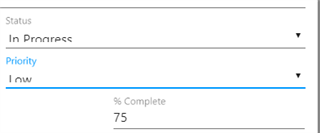
Any idea how to fix this ?

Sign In to post a reply

Replies

  • 0
    Tom Miller
    Tom Miller answered on May 14, 2019 10:58 PM

    Here is the Code i am using to create the DropDown

    <form novalidate [formGroup]="form"> <igx-input-group #inputGroup class="input-group" [igxToggleAction]="dropDown"> <input #input class="input" type="text" igxInput [igxDropDownItemNavigation]="igxDropDown" readonly= "true" placeholder="{{placeholder}}" formControlName="selected" (keydown.ArrowDown)="openDropDown()"/> <label *ngIf="label && label.length" igxLabel>{{label}}</label> <igx-suffix igxButton="icon" class="dropdownToggleButton" igxRipple> <igx-icon *ngIf="igxDropDown.collapsed; else toggleUp" fontSet="material">arrow_drop_down</igx-icon> <ng-template #toggleUp> <igx-icon fontSet="material">arrow_drop_up</igx-icon> </ng-template> </igx-suffix> </igx-input-group> <igx-drop-down #dropDown (onSelection)="onSelection($event)"> <igx-drop-down-item *ngFor="let option of options" [value]="option.value" [isSelected]="option.name === selected.value"> {{ option.name }} </igx-drop-down-item> </igx-drop-down> </form>
    • 0
      Milko Venkov
      Milko Venkov answered on May 15, 2019 1:24 PM

      Hello Tom,

      Looking at the pictures you provided this looks like an issue in our input component. Using the code you provide I have created small sample in StackBlitz here. I was not able to reproduce the issue you are showing in my sample. Can you try to modify my sample and reproduce this issue so I can investigate it further?

      Looking forward to your reply and sample provided.

      • 0
        Tom Miller
        Tom Miller answered on May 16, 2019 9:16 PM

        Thanks, i tried to move straight to your Drop down but i cant find a solution for the following situation.
        I have a Text and Value for each item in the drop down box. I can click on drop down and get the list of Text fine but when i click on it , i don't want to display the value , i want to display the text in the drop down box.
        For example user selects France which has an value of FR but i still want the list to show the text of France and then when i have to submit my form i will send the value of the selected item instead of the Displayed Text.

        Here is what i played around with

        https://stackblitz.com/angular/emvybdgvxel

      • 0
        Milko Venkov
        Milko Venkov answered on May 17, 2019 11:22 AM

        Hi Tom,

        In your sample you are using input. The input is limited to only one property – value. Whatever you set to value this will be shown in the input and send to the server on form submit. To solve this you may add one additional hidden input. In this hidden input you should set the value of the drop down item and in the visible one the text of the drop down item. Please check updated StackBlitz here showing how to achieve this.

        Please keep in mind you may also use our IgxCobo or IgxSelect components. First one is multi select drop down while the second is single select.

        Please let me know if any additional questions on this matter arise.

  • You must be logged in to reply to this topic.
Discussion created by
Favorites
Replies
Created On
Last Post
Discussion created by
Tom Miller
Favorites
0
Replies
4
Created On
May 17, 2019
Last Post
6 years, 9 months ago

Suggested Discussions

Created by

Created on

May 17, 2019 11:22 AM

Last activity on

Feb 19, 2026 2:43 PM