Skip to content

Infragistics Community Forum / Web / Ignite UI for jQuery / Excel is showing column1, column2 where we have column number in parent grid < column number in child grids .Want to remove extra columns where data is not present

Excel is showing column1, column2 where we have column number in parent grid < column number in child grids .Want to remove extra columns where data is not present

New Discussion
Tapas Bisoi
Tapas Bisoi asked on Nov 15, 2019 3:15 PM

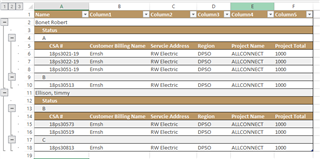
In hierarchical grid where we have (number of columns in parent) <  (number of columns in child), for the difference in column number we get Column1, Column2 in the header (See B1,C1,D1,E1,F1 cells in the snapshot).

I have attached the snapshot below.
Sign In to post a reply

Replies

  • 0
    Martin Asenov
    Martin Asenov answered on Nov 8, 2019 1:46 PM

    Hello Tapas,

    Thank you for posting in our community.

    Usually this happens when the header text of the column is omitted in the columns array.

    If this is not your case, then please provide more information about the behavior leading to your issue. A working sample will be much appreciated.

    Kind regards,
    Martin

    • 0
      Tapas Bisoi
      Tapas Bisoi answered on Nov 8, 2019 3:48 PM

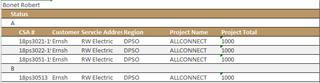
      In my code,I have hierarchical grid which is having only 1 column (Name) in main or parent grid which is "Bonet Robert" and under that grid,I do have one more grid with only one column(status) which is "A" and under "A" , I have one more grid which is having all other columns like "Address,Billing  name,region" etc.

      Now when I export this to excel ,I get column 1 ,column 2 and so on for the main grid which is having only 1 column "Name" .

      you can match these values with the excel.

      var northwind = {

                  "results": [

                      {

                          "Name": "Bonet Robert",

                          ProjectStatus: [

                              {

                                  "ProjectStatus": "A",


                                  Orders: [

                                      {

                                          “CSA”: “18ps3021-19”, “CustomerBillingName”: “Ernsh”, “ServiceAddress”: “RW Electric”,

                                          “Region”: “DPSO”, “ProjName”: “ALLCONNECT”,

                                          “ProjectTotal”: “1000”


                                      }                            

                                  ] 

                              }    ]   }]}                    


      • 0
        Martin Asenov
        Martin Asenov answered on Nov 11, 2019 3:25 PM

        Hello Tapas,

        Thank you for the sample data. The GridExcelExporter uses the Excel Library under the hood. So when you are exporting the igHierarchicalGrid with child band that has more columns than the root one, the default behavior of the Excel Library is to assign a default value if there is no defined one in the columns property of igHierarchicalGrid.

        I have created and attached a sample that uses the exportEnding event to set manually the columns headers.

        Looking forward to hearing from you.


        Attachments:
      • 0
        Tapas Bisoi
        Tapas Bisoi answered on Nov 13, 2019 11:25 AM

        Your sample is working only for 2 columns . Its not working for more than 2 columns .If I am adding one more column in the child grid and adding a row args.worksheet.rows().item(0).setCellValue(3, "  "); in exportEnding event ,its giving extra column header as "2" .

      • 0
        Martin Asenov
        Martin Asenov answered on Nov 13, 2019 5:00 PM

        Hello Tapas,

        I have sent you only a demonstration of how to use our Excel Library. The implementation was hardcoded. However I have modified the sample and now it should handle any number of columns.

        Regarding your second question, about the cell formatting, please keep in mind that according to our support policy we handle single support forum thread per query. This helps us ensure that all your issues are addressed correctly. Please create a new forum post about the issue you are experiencing so the other users in our forum will benefit in case that they are experiencing the same issues.


        Attachments:
      • 0
        Tapas Bisoi
        Tapas Bisoi answered on Nov 15, 2019 10:17 AM

        Thanks Martin, Its working perfectly now .

      • 0
        Martin Asenov
        Martin Asenov answered on Nov 15, 2019 3:15 PM

        Hello Tapas,

        I am glad to know that I was able to help you achieve the functionality you were looking for.

        Thank you for using Infragistics components.

  • 0
    Tapas Bisoi
    Tapas Bisoi answered on Nov 13, 2019 9:58 AM

    Thanks for your help Martin, Its working .

    I have one more issue in the same excel .I have a column (Project Total) which has datatype as “Number” and format as “Currency” .When I am exporting it to excel, cell format is getting change from number to text . I want the cell format as it is which is “Number” .

  • 0
    Johsnon henry
    Johsnon henry answered on Feb 26, 2026 4:57 PM

    If you find your equalizer not working after a Windows 11 update, the most common culprit is the Windows audio subsystem overriding your APO settings. To fix this, open the Configurator.exe, select your playback device, and enable “Troubleshooting options.” Switch the “Install as” dropdown from LFX/GFX to SFX/EFX (or vice versa). Restart your PC to re-hook the driver. This ensures your custom presets remain active despite system-level changes.

  • You must be logged in to reply to this topic.
Discussion created by
Favorites
Replies
Created On
Last Post
Discussion created by
Tapas Bisoi
Favorites
0
Replies
9
Created On
Nov 15, 2019
Last Post
3 hours, 5 minutes ago

Suggested Discussions

Created by

Created on

Nov 15, 2019 3:15 PM

Last activity on

Feb 16, 2026 3:24 PM