"Radio buttons automatically group by default with other radio buttons within the same control container. They can also be grouped manually using a Radio Button Group Manager component, allowing for a custom schema and uniform appearance."
I'm not entirely sure what that means in a practical sense. Is there a sort of hidden group mgr that I can put all the code in? Or is the extent of them grouping by default only so they ensure that only one of them is active at once? In other words, what's the extent of their auto grouping?
Bozhidara Pachilova
answered on Jan 11, 2023 1:54 PM
Hi Sean,
Thank you for posting to Infragistics Community!
You are correct that the UltraRadioButtonGroupManager is used to manually group UltraRadioButtons. As also pointed by our documentation here, the RadioButtons within a GroupManager will also honor any appearance settings made to it. As you have already figured out yourself, the GroupManager exposes the SelectionChanged event that occurs when the user selects (or de-selects) one of the radio buttons in this group.
To address your question about the “automatic grouping” of radio buttons in case a Group Manager is not used, I have created a small sample demonstrating the idea, which you can find attached below this message.
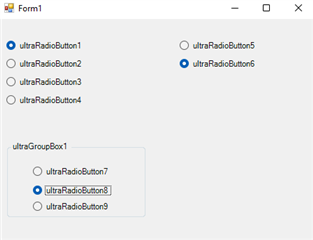
The form in the sample contains three groups: radio buttons 1 to 4 are grouped and their grouping container is the Form, radio buttons 5 and 6 are using the UltraRadioButtonGroupManager, and radio buttons 7 to 9 have an UltraGroupBox as a grouping container.
In practice, this means that these are separate groups, so single radio buttons from each can be selected at the same time:
Finally, I understand that what concerns you is the fact that unless you are using a GroupManager, you have to hook a separate event (I assume CheckedChanged or similar) for each radio button. This is true, and the idea behind the GroupManager is precisely to ease working with buttons in a group.
Nevertheless, there exist workaround approached to shortening the code required to hook the same logic to all radio buttons in a group. For instance, the sample demonstrates the following:
  private void Form1_Load(object sender, EventArgs e)
        {
            var firstGroup = this.ultraRadioButton1.GetAllRadioButtonsInGroup().ToList();
            foreach (UltraRadioButton radioButton in firstGroup)
            {
                radioButton.CheckedChanged += RadioButtonsGroup1_CheckedChanged;
            }
        }

   private void RadioButtonsGroup1_CheckedChanged(object sender, EventArgs e)
        {
            UltraRadioButton rb = sender as UltraRadioButton;
            if (rb.Checked)
            {
                Console.WriteLine("Radio button from Group 1 Checked!");
            }
        }
So, I hope these points provide some additional insight on grouping radio buttons. If you require any further assistance on the matter, please, let me know.
Best regards, Bozhidara Pachilova Associate Software Developer


 Sean McCown


