Skip to content

IGX Dialog CSS issue

New Discussion
Perunthagai jaganathan
Perunthagai jaganathan asked on Dec 6, 2024 3:58 PM

Hi , we are using multiple child components in one parent and each child component uses igx dialog . each have there own width , height , overflow etc. To make some customization we are overriding   igx dialog window class.

.igx-dialog__window {
        max-height: 70%;
        width: 60%;
        position: fixed;
        top: 15%;
        left: 20%;
        background: #fff;
        z-index: 1;
        overflow: auto;
    }
in certain child components this is not working and we have to use ::ng-deep to make it work. if we use :: ng-deep it is applied globally and we dont want that. 
tried using :host ::ng-deep that also seems to not work. any recommendations on how to set the custom css styles to individual child compone nts igx dialog  or can we apply  any custom class to the igx dialog directive and customize css for that dialog rather than applying for  .igx-dialog__window  as generic
Sign In to post a reply

Replies

  • 0
    Georgi Anastasov
    Georgi Anastasov answered on Jan 25, 2023 9:03 AM

    Hello,

    I have been looking into your question and your requirements to style igx-dialog components in each of your individual components could be achieved with Ignite UI Angular Theming.

    To get started with styling the dialog windows, you need to import the index file in each .scss component file, where all the theme functions and component mixins live:

    @use "igniteui-angular/theming" as *;

    Next you will create a new theme for each dialog in each component that extends the dialog-theme and accepts parameters that style the dialogs:

    $my-dialog-theme: dialog-theme(
                   $background: #011627,
                   $title-color: #ecaa53,
                   $message-color: #fefefe,
                   $border-radius: .3,
    );

    Since the dialog windows use the IgxOverlayService, in order for our each custom theme to reach down the each dialog window that you want to style, you will provide a specific outlet where the dialog window will be placed in the DOM when it is visible. In short, you'll set the igxOverlayOutlet directive on each element that contains the dialog itself:

    The last step is to include the component theme in each of yours components:

    :host {
         ::ng-deep {
            @include dialog($my-dialog-theme);
        }
    }

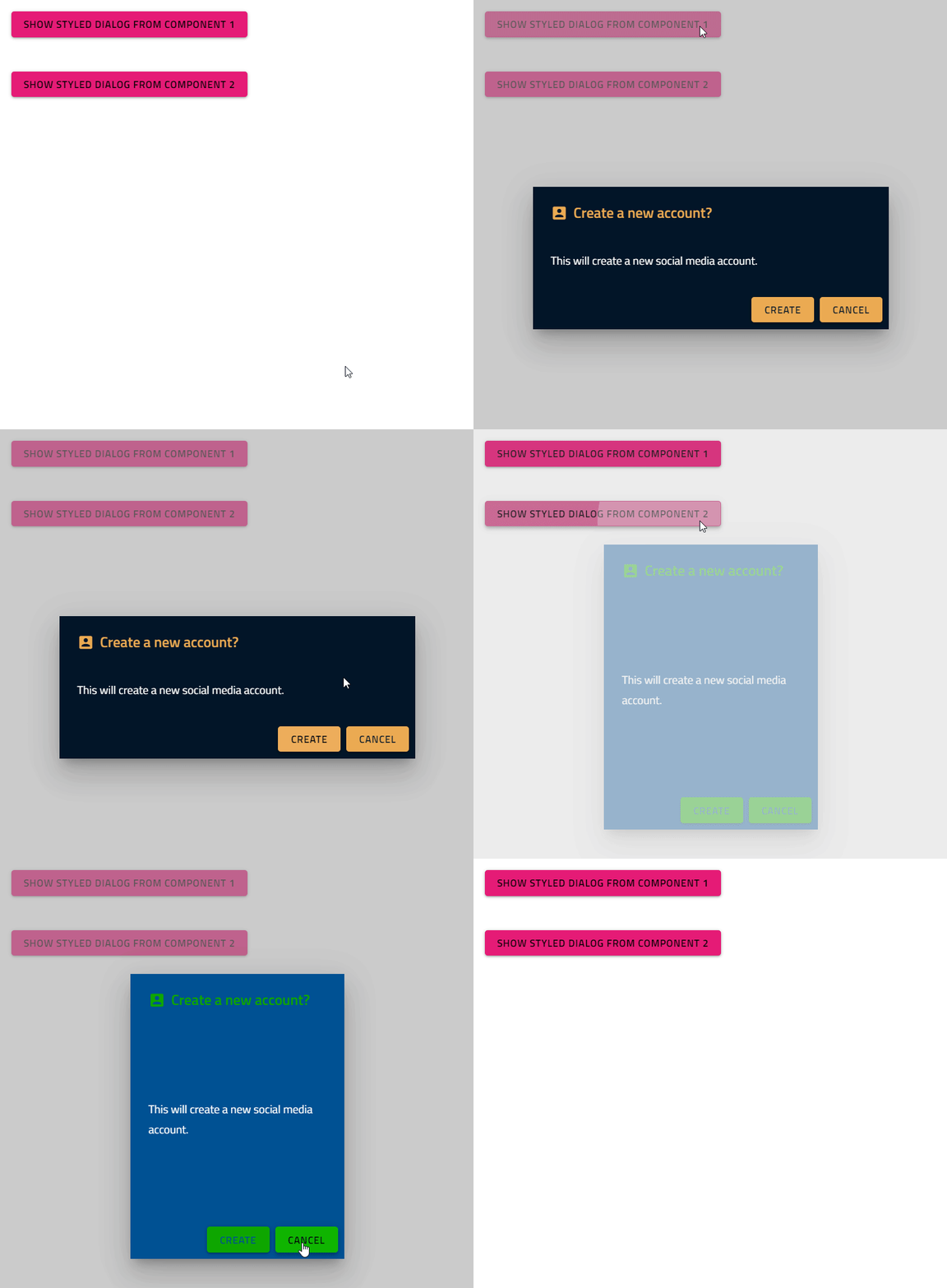
    The described scenario could be observed here:

    In addition, I have prepared small sample with two components that each has single igx-dialog component. The two child components is included in the parent app.component and and each component implements the above approach to style its igx-dialog. This sample could be found here. Please test it on your side and let me know how it behaves.

    If you require any further assistance on the matter, please let me know.

    Regards,

    Georgi Anastasov

    Entry Level Software Developer

    Infragistics

    • 0
      Perunthagai jaganathan
      Perunthagai jaganathan answered on Jan 27, 2023 5:13 AM

      Hi, thanks for the inputs. styling am able to make  it work. the major blocker is we are not able to set the custom width, height etc at the dialog level. say in one component we want the height and width to be smaller and in other component the dialog size should be bigger where the dialog is occupying 80% of view port. 

      can you share some example for the same where the width height is set  at  

      igx-dialog level and not within the dialog , you can update the same example for more clarity
      • 0
        Georgi Anastasov
        Georgi Anastasov answered on Jan 27, 2023 10:13 AM

        Hello,

        Thank you for the provided additional information.

        I have been looking into your question and your requirements can be achieved in the same way. After you've followed the steps in my previous answer for each igx-dialog in each own component, in the final step where you add the themes and style the igx-dialog itself you can add additional custom styles for the different parts of the igx-dialog.

        This will be achieved by in a component scss file in ::ng-deep which is in :host, select the class of the given dialog in the given component with .igx-dialog__window and apply custom styles for each according to your custom logic and preferences:

        :host {
                       ::ng-deep {
                                      @include css-vars($my-dialog-theme);
                                      .igx-dialog__window{
                                                     width: 300px;
                                                     height: 500px;
                                                     display: flex;
                                                    flex-direction: column;
                                                    justify-content: space-between;
                                      }
                       }
        }

        The described scenario could be observed here:


        I have modified my previous sample illustrating this suggestion which could be found here. Please test it on your side and let me know how it behaves.

        Thank you for your cooperation.

        Regards,

        Georgi Anastasov

        Entry Level Software Developer

        Infragistics

      • 0
        Perunthagai jaganathan
        Perunthagai jaganathan answered on Jan 27, 2023 10:34 AM

        hey thanks i have tried this part and have running in to issues.

        i have tried below things  

        1. setting style for  .igx-dialog__window{  –  doesnt work

        2. setting style for  .igx-dialog__window{  with ng deep  – works

        3.  setting style for  .igx-dialog__window{ with :host ng deep    –  doesnt work

        in the scenarios where it doesnt work it takes the css from dialog-theme and not the customized one which i have added . any thing else i need to do or what would be the best way to troubleshoot this

      • 0
        Milos Andjelkovic
        Milos Andjelkovic answered on Dec 6, 2024 3:58 PM

        Im having issues too with styling need help quick.

        It won't change the dialog theme (i want to make it transparent)  i need help i tried everything. \:host ::ng-deep, i don't have any compile issues.
        Only thing that worked is
        ::ng-deep .igx-dialog__windows
           background: transparent !important
           box-shadow: none !important
        But this way it changes to all my igx-dialogs what i don't want. Thanks in advance for help.

      • 0
        Perunthagai jaganathan
        Perunthagai jaganathan answered on Jan 27, 2023 11:26 AM

        one thing i can notice css is rendered in the DOM for that component but the igx dialog rendered is generated generically with out mapping to style sheet which is rendered as _ngcontent-sjp-c396. 

      • 0
        Georgi Anastasov
        Georgi Anastasov answered on Jan 27, 2023 2:00 PM

        Hello,

        As you can see from the created sample, I am using two Angular components that I add in one parent component and each containing one igx-dialog component, wrapped in a div element with an igxOverlayOutlet directive. After that, in each component in the scss file, I create a :host in which there is ::ng-deep and in it I select the igx-dialog window itself with the .igx-dialog__window class and I set custom styles to it. On my side everything works as expected and as you can see from the created sample and from the provided video, I am able to change the width and height of each igx-dialog component from any Аngular component as well as add additional styles to it. I am using latest Ignite UI Angular version ^15.0.0.  


        What I could advise you is to make sure that you have gone through all the steps that I have described in my previous answers and that you have completed them correctly. Also, in this special case, it is important for you to wrap the igx-dialog component itself in another element that contains the igxOverlayOutlet directive so that the overlay can be accessed and styled.

        Here you will find my sample for your reference. If this is not an accurate demonstration of what you are trying to achieve, please feel free to modify it and send it back to me along with steps to reproduce. Alternatively, if the behavior cannot be replicated, please feel free to provide your own sample. Please provide more information on how you create your components, where the igx-dialog components are located as well as how you try to style them. Additional information, screenshots, video or code snippets will be of great help, and the best option is to provide your sample where you reproduce the described scenarios.

        Having a working sample on my side, which I can debug, is going to be very helpful in finding the root cause of this behavior. 

        Thank you for your cooperation.  

        Regards,

        Georgi Anastasov

        Entry Level Software Developer

        Infragistics

      • 0
        Perunthagai jaganathan
        Perunthagai jaganathan answered on Jan 27, 2023 2:38 PM

        thank you !!! i missed the igxOverlayOutlet  and that hint solved it. 

      • 0
        Georgi Anastasov
        Georgi Anastasov answered on Jan 27, 2023 3:02 PM

        Hello,

        I am glad that you find my suggestion helpful.

        Thank you for using Infragistics components.

        Regards,

        Georgi Anastasov

        Entry Level Software Developer

        Infragistics

  • 0
    Dian Jelqzkov
    Dian Jelqzkov answered on Feb 3, 2026 3:05 PM

    _c10_thread_id test test

  • You must be logged in to reply to this topic.
Discussion created by
Favorites
Replies
Created On
Last Post
Discussion created by
Perunthagai jaganathan
Favorites
0
Replies
10
Created On
Dec 06, 2024
Last Post
3 weeks, 2 days ago

Suggested Discussions

Tags

Created on

Dec 6, 2024 3:58 PM

Last activity on

Dec 6, 2024 3:58 PM